Last Updated: 1 week ago | John Miller
If you’ve ever caught yourself staring at your Spectrum router wondering whether that color is normal or a sign something’s wrong, you’re not alone. It’s the single most common question I get about Spectrum equipment.
The light on your Spectrum router changes based on what it’s doing: booting up, connecting, running an update, or flagging a real problem. Once you know what each one means, most “is my internet broken” moments turn into a quick glance instead of a panic.
Here’s the part most guides skip: Spectrum has shipped three router generations, Wi-Fi 6, Wi-Fi 6E, and Wi-Fi 7, and the light system genuinely isn’t identical across them. A red light doesn’t always mean the same thing on every Spectrum router.
This guide covers what each color means generally, and breaks out the model-specific differences where they actually matter, so you’re not troubleshooting based on the wrong router’s instructions.
Key Takeaways
- Light meanings aren’t identical across Spectrum’s router generations, so confirm which model you have before troubleshooting.
- Red is the color that varies most between models; its exact meaning depends on whether you’re running Wi-Fi 6, 6E, or 7.
- Red and blue (or red and blue/green) flashing together means a firmware update is running. Leave the router alone until it finishes.
- Red and white alternating usually points to overheating, not a lost connection, so check placement before resetting anything.
- A proper power cycle, unplugged for a full 30-45 seconds, clears a lot of these issues without needing a factory reset.
Quick Comparison by Router Model
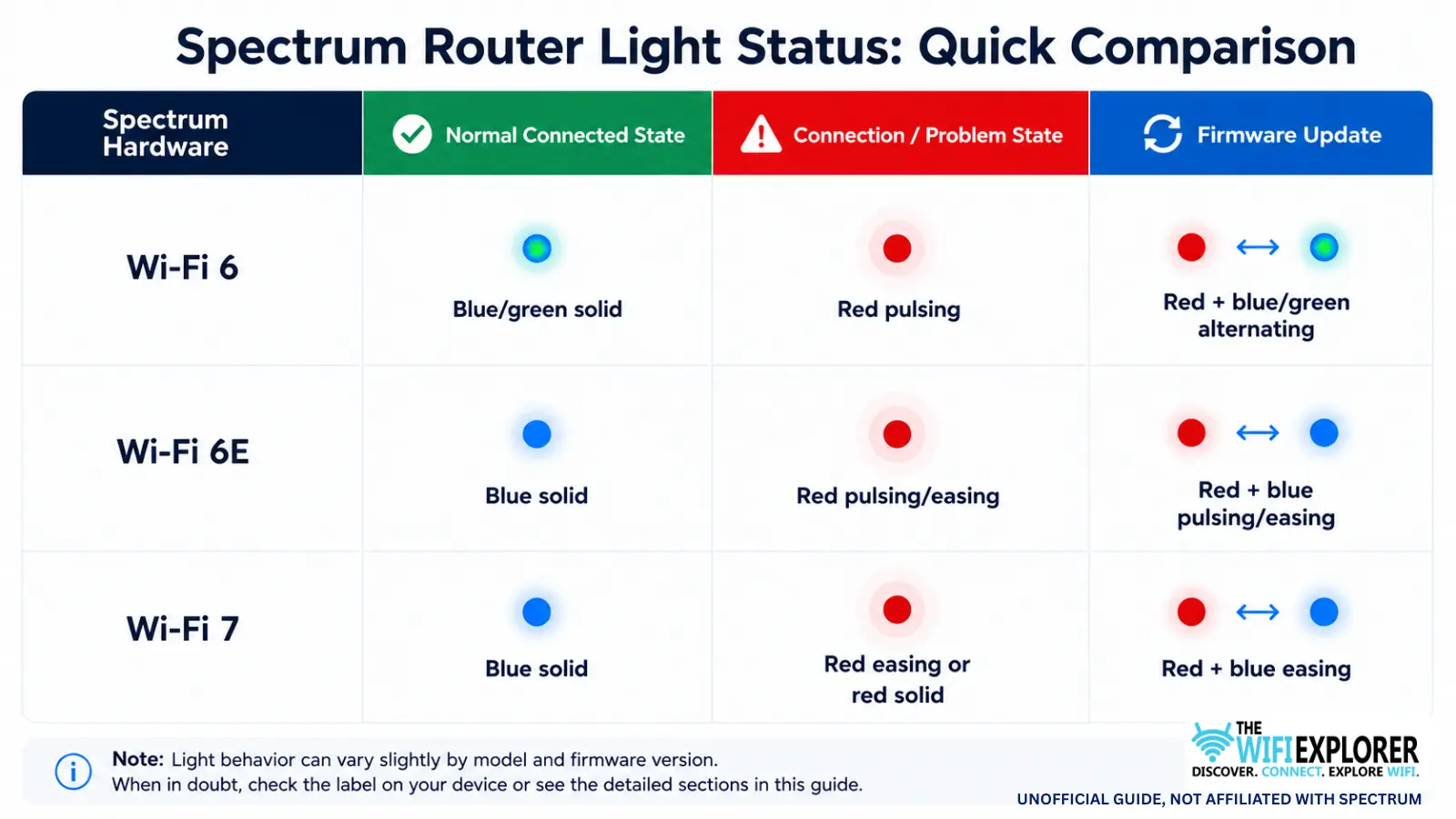
Not sure which router you have? Check the label on the device itself, or look under the Wi-Fi section of the My Spectrum app, where your equipment is listed by name.
Running Eero instead of a Spectrum router? The light patterns and troubleshooting steps are different for mesh setups; see Does Eero Work With Spectrum? for how that combination handles connectivity.
What Do Spectrum Router Lights Mean?
No Light: Power Issue
No light at all means the router isn’t getting power, not that it’s lost its internet connection. This one’s consistent across all three router generations. Check that it’s securely plugged into a working outlet, and try a different outlet or cable if you’re not sure the current one is the problem.
Blinking White: Booting Up or Connecting
A blinking white light shows up right after a restart or during initial setup, while the router establishes its connection. This is normal for the first minute or two on any Spectrum model. It only becomes worth troubleshooting if it never settles into a solid light.
Blinking Blue: Connecting or Pairing
Blinking blue generally means the router’s in the process of connecting, or on some models, that it’s in pairing/setup mode. This is one of the states that varies most by hardware.
On the Wi-Fi 7 router specifically, there’s no WPS option at all, so a blue light there can’t mean pairing the way it might on older equipment; it’s strictly a connecting-state indicator. If it’s stuck blinking well past the normal startup window, a restart usually clears it.
Solid Blue or Green: Connected to the Internet
Once connected, the Wi-Fi 6 router shows solid blue/green, while the Wi-Fi 6E and Wi-Fi 7 routers show solid blue only, no green. Whichever color applies to your model, a steady light here means you’re online and everything’s working.
If specific devices still can’t connect despite this, the issue is more likely with that device’s Wi-Fi than with the router itself.
Blinking or Solid Red: Connection or Access Problem
This is the section where knowing your exact model matters most, since red means genuinely different things depending on your hardware.
On the Wi-Fi 6 router, pulsing red means a connectivity issue, up to and including no internet connection at all.
On the Wi-Fi 6E router, red pulsing or easing has been described in Spectrum’s own documentation a couple of different ways across versions, sometimes as no internet connection, sometimes as connectivity without management access. That’s an important distinction: one means you’re offline, the other means you’re actually connected but can’t reach the router’s settings remotely. Don’t assume the worst before checking whether your devices can still reach the internet.
On the Wi-Fi 7 router, a slow-easing red light specifically means connectivity without management access, while a solid (non-pulsing) red light means broader router trouble. So on this model, the pattern itself, easing versus solid, is the thing to pay attention to, not just the color.
Across all three, start by checking for a local outage before you touch any cables.
Red and White Alternating: Overheating
This pattern doesn’t look as alarming as solid red, but it’s telling you something specific: the router’s running too hot. This state has been documented specifically on the Wi-Fi 6 router.
Make sure it’s in an open, ventilated spot and not tucked inside a cabinet or closet, and away from other heat-generating electronics.
Red and Blue Alternating: Firmware Update
If you see red and blue (or red and blue/green on the Wi-Fi 6 router) flashing together, your router’s installing a firmware update in the background. This behavior is consistent across all three generations.
Leave it alone; it’ll restart on its own once the update finishes, and cutting the power mid-update tends to cause more problems than it solves.
Common Scenarios and What They Usually Mean
Internet feels slow, and the light’s pulsing red on and off. This is often a weak signal or interference rather than a dead connection, especially on the Wi-Fi 6E and 7 routers where that pulsing/easing pattern doesn’t always mean total outage. Try moving the router to a more open, central spot before assuming the worst.
One device can’t connect, but everything else is fine. If the router’s light is solid and stable, the problem is almost always with that one device, not the router. Restart the device itself before you touch the router settings.
The light won’t stop blinking blue after setup. Double-check you’re not still mid-setup in the My Spectrum app. If setup finished and it’s still blinking, a restart is the next step rather than a factory reset.
Tips for Troubleshooting Based on Light Patterns
- Confirm your router model first. It changes what a red light actually means, so this step saves you from chasing the wrong fix.
- Restart the router before anything else. It clears more issues than people expect, and it costs nothing to try.
- Check for a local outage before assuming your equipment is at fault, especially with anything red.
- Give the router room to breathe. Central, open placement helps with both signal strength and the overheating pattern above.
- Don’t interrupt firmware updates. A red-and-blue pattern means leave it alone, not unplug it.
- Factory reset as a last resort. It clears stuck states but wipes your custom Wi-Fi name and password, so save it for when the basics don’t work.
Final Words
Most Spectrum router lights aren’t as mysterious as they look once you know what to check, and once you know which router you actually have.
A stuck white or blue light is usually a startup hiccup on any model. Red deserves a closer look, but its exact meaning shifts depending on your hardware, so that’s the one color worth double-checking against your specific router before you assume the worst.
And a light you’ve never seen before, like red and white, is often just the router asking for a little more airflow.
FAQ
What does a solid red light mean on my Spectrum router?
It depends on the model. On Wi-Fi 6 and 6E, red pulsing generally points to a connectivity problem. On Wi-Fi 7, a solid (not pulsing) red light means broader router trouble specifically. Check for an outage first, then check your connections.
Why is my Spectrum router blinking blue?
Usually it means the router’s connecting, or on some models, in setup mode. Note that Wi-Fi 7 routers don’t support WPS at all, so blue there is purely a connecting indicator. If it’s stuck after the normal startup window, a restart typically fixes it.
Is a blinking white light on my Spectrum router normal?
Yes, right after a restart or during setup, on any Spectrum router model. It becomes a problem only if it never turns solid after a few minutes.
What do red and white mean on a Spectrum router?
That combination usually means the router is overheating, documented specifically on the Wi-Fi 6 router. Move it somewhere open and ventilated rather than resetting it.
Do all Spectrum routers use the same light colors?
Not exactly. The Wi-Fi 6 router uses blue and green for its normal state, while the Wi-Fi 6E and Wi-Fi 7 routers use blue only. Red is the color most likely to mean different things depending on which model you have, so it’s worth confirming your router before troubleshooting a red light.