Last Updated: 1 month ago | John Miller
A Blinking white light is usually the least alarming light your Spectrum router shows you, and also one of the most common reasons people end up searching for help anyway.
It’s supposed to be temporary. The trouble starts when it isn’t.
I touched on this briefly in the general Spectrum lights guide, but it’s worth its own breakdown, mainly because the real question isn’t “what does it mean,” it’s “how long is too long,” and that’s the part most people can’t figure out on their own.
Key Takeaways
- Blinking white is normal during startup and setup, on every Spectrum router model.
- Unlike red, this state doesn’t vary by hardware generation; Wi-Fi 6, 6E, and 7 all behave the same way here.
- If it hasn’t turned solid within 5-10 minutes, something’s actually wrong; it’s not still “just booting.”
- Loose cables and interrupted setup are the two most common causes once it’s genuinely stuck.
- A proper power cycle resolves most cases before you need to touch anything else.
Quick Reference: How Long Is Normal?
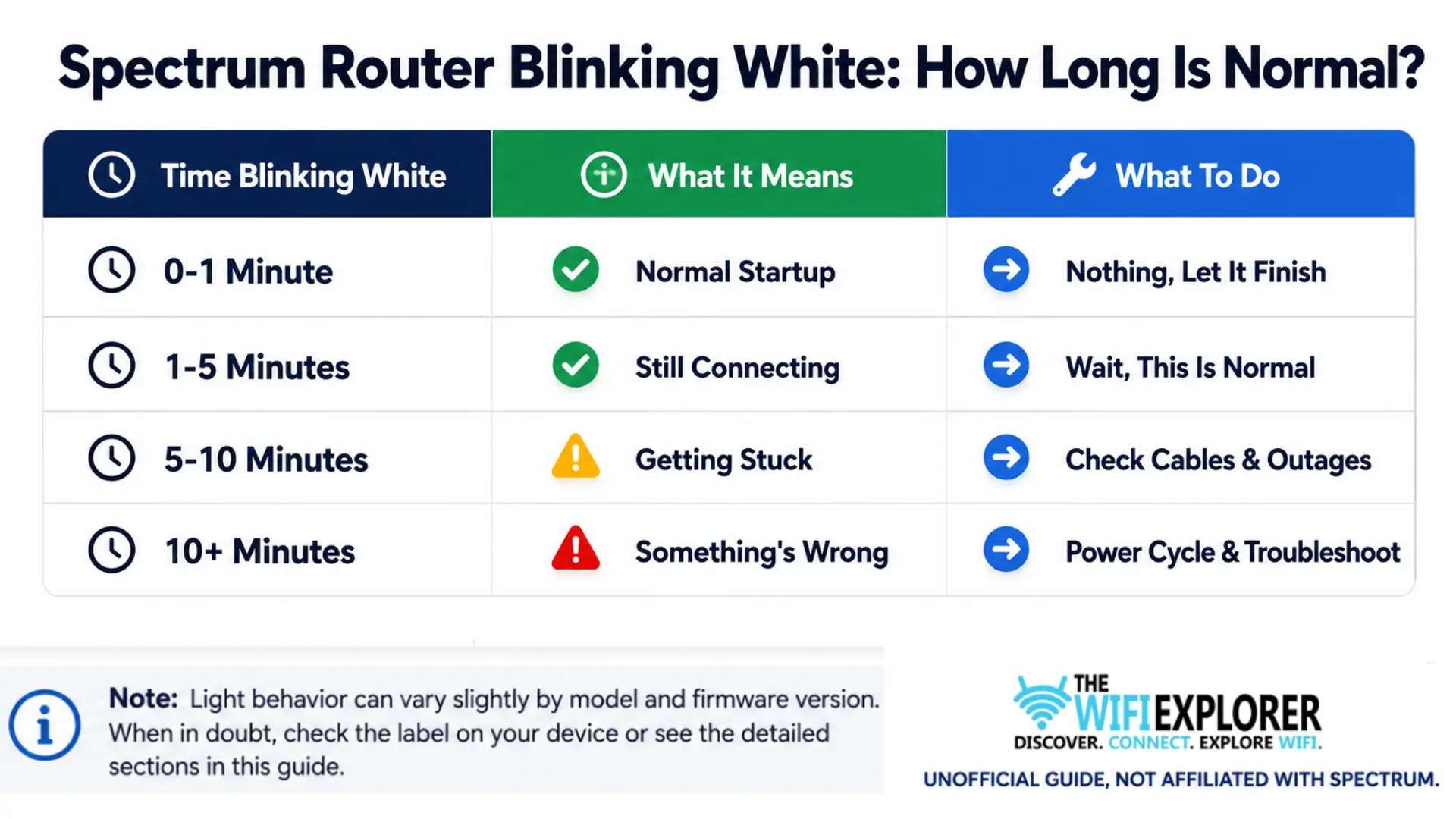
This applies the same way regardless of which Spectrum router you have; unlike red, there’s no model-specific version of this table to worry about.
Spectrum Router Blinking White
A blinking white light on your Spectrum router means it’s booting up or actively establishing its connection to Spectrum’s network.
It’s a normal, expected phase, not a warning sign, and it shows up after a fresh power-on, a restart, or during initial setup. The only time it’s worth troubleshooting is if the light never settles into a solid white after a reasonable window, which is what the rest of this guide covers.
What Blinking White Actually Means
Think of it as the router saying “give me a minute.” It’s cycling through its startup sequence, checking its own hardware, then reaching out to authenticate with Spectrum’s network. Once that handshake completes, the light turns solid, and you’re online.
This process normally takes somewhere between one and five minutes. If you just plugged the router in or restarted it, don’t touch anything yet; let it finish.
Why It Gets Stuck
If blinking white sticks around well past that window, something interrupted the process. The usual suspects:
- A loose or improperly seated coax or Ethernet cable
- A local Spectrum outage happening right as the router tries to connect
- The modem not fully activated or provisioned yet, especially on a new install
- A firmware update running in the background that’s taking longer than usual
- A router that didn’t fully reset from a previous power cycle
How to Fix It
Give it time first. This sounds obvious, but it’s the step most people skip. If you just restarted or plugged in the router, wait the full five minutes before assuming something’s broken.
Check your cable connections. Run your hand along the coax and Ethernet cables and confirm both ends are fully seated, not just resting in the port. A cable that looks connected but isn’t fully clicked in is one of the most common causes of a stuck white light.
Check for a local outage. Pull up Spectrum’s outage map or the My Spectrum app. If there’s an outage, the router will keep trying to connect and failing no matter what you do to it; you’re just waiting it out.
Power cycle properly. Unplug the router, wait a full 30-45 seconds, not a quick five-second unplug, then plug it back in. Give it the full startup window again before judging whether it worked.
Try a different outlet or cable if the issue repeats. If the router blinks white, seems to connect, then drops back to blinking white repeatedly, the power source or a specific cable might be intermittently failing rather than the router itself.
Factory reset as a last resort. If none of the above clears it, a factory reset can resolve a stuck provisioning handshake. It wipes your custom Wi-Fi name and password, so treat it as the final option, not the first one you reach for.
Does This Vary by Router Model?
Not really, and that’s actually the exception rather than the rule for this site’s Spectrum coverage. The Wi-Fi 6, Wi-Fi 6E, and Wi-Fi 7 routers all use a blinking white light during the same booting/connecting phase, and the troubleshooting steps above apply the same way across all three.
If you’re dealing with a stuck light and you’re not sure which color you’re actually looking at, or it’s shifted into blinking blue or red instead, that’s a different state entirely; check the full Spectrum lights guide to confirm which one applies.
General Troubleshooting Tips
- Don’t panic in the first five minutes. Blinking white right after a restart is expected, not a problem.
- Cables first, reset last. A loose connection causes this far more often than a genuine hardware issue.
- Check for outages before blaming your equipment. No amount of power cycling fixes a Spectrum-side outage.
- Watch for a pattern, not just a single instance. If it connects, then drops back to blinking white repeatedly, that’s a different problem than a one-time slow boot.
When to Contact Spectrum Support
If you’ve waited out the normal startup window, checked your cables, confirmed there’s no outage, power-cycled properly, and the light is still blinking white after all that, it’s worth contacting Spectrum Support. Have this ready:
- Your account information
- How long the light has been stuck
- Whether this is a new install or an existing router that suddenly started doing this
- What you’ve already tried
That context helps Spectrum’s support team skip straight to actual diagnostics instead of repeating steps you’ve already done.
Final Words
Blinking white is the light most likely to resolve itself if you just give it a minute, and the one people most often troubleshoot too early. The real skill here isn’t knowing a dozen fixes; it’s knowing when five minutes is normal and when it’s time to actually check something.
Past that window, a loose cable or a quick power cycle clears the vast majority of stuck cases, and unlike red, you don’t need to worry about which router model you have; this one behaves the same way across all of Spectrum’s hardware.
FAQ
Is blinking white normal on a Spectrum router?
Yes, during the first one to five minutes after a restart or during initial setup. It only becomes a concern if it never turns solid after that window.
How long should my Spectrum router blink white before I worry?
Give it five to ten minutes. Past that, it’s reasonable to start checking cables and looking for a local outage rather than continuing to wait.
Does blinking white mean different things on different Spectrum routers?
No, this is one of the few states that’s consistent across Wi-Fi 6, 6E, and 7. Unlike red, you don’t need to know your exact model to troubleshoot this one.
Why does my Spectrum router keep blinking white after I fixed it once?
If it connects and then drops back to blinking white repeatedly, that points to an intermittent cable or power issue rather than a one-time slow startup. Try a different outlet and cable before resetting.
Will a factory reset fix a stuck blinking white light?
It can, if the issue is a stuck provisioning handshake, but it should be your last step. It wipes your Wi-Fi name and password, and it won’t fix a problem caused by an outage or a bad cable.