Last Updated: 1 month ago | John Miller

Every other light on a Spectrum router tells you something about your connection. No light at all tells you something different: the router isn’t getting power in the first place. It’s actually one of the simpler problems on this list, once you know where to look.
I covered this briefly in the general Spectrum lights guide, but it’s worth its own walkthrough, mostly because people tend to jump straight to “my router’s dead” when the actual cause is usually something much smaller.
Seeing a Spectrum router with no lights at all is unsettling at first glance, but the fix list is short.
Key Takeaways
- No light at all means a power problem, not a lost internet connection. This is consistent across every Spectrum router model.
- A Spectrum router not lighting up is almost always traced back to the outlet, the cable, or the adapter, in that order of likelihood.
- Try a different outlet before assuming the router itself has failed.
- If it’s a rental unit and nothing brings it back, Spectrum will typically swap it at no extra cost.
- This is one of the few states where a factory reset won’t help. No power means the router can’t respond to anything.
Quick Reference: What to Check First
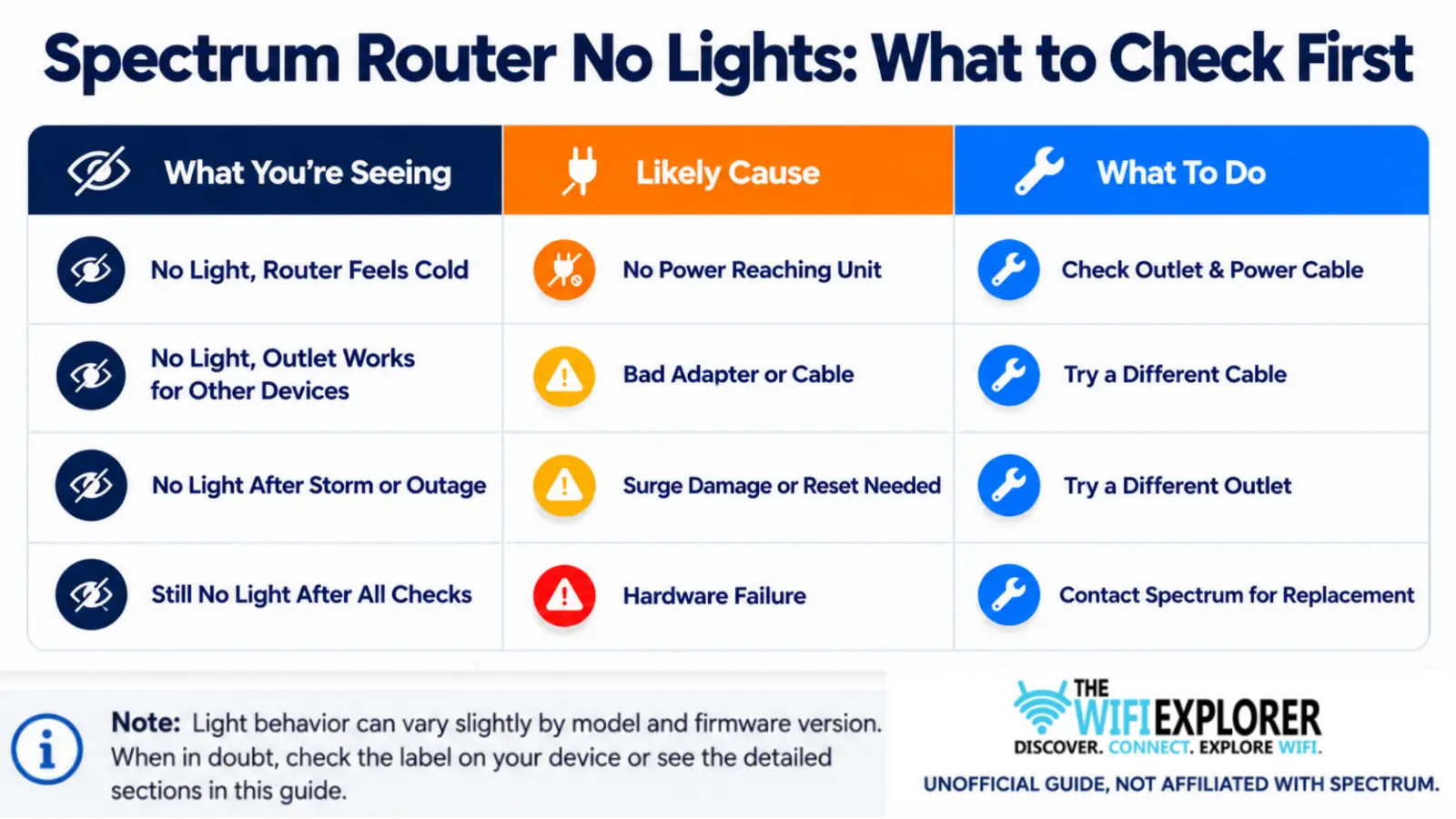
Spectrum Router Not Lighting Up
A Spectrum router not lighting up at all means it isn’t receiving power, not that it’s lost its connection to the internet. This is a genuinely different category of problem than every other light state covered in this series, since there’s no color or pattern to interpret; the device simply isn’t turning on.
The good news is that this also makes it one of the more straightforward issues to work through, since the list of possible causes is short and each one is easy to test.
Why It Happens
- The router isn’t plugged in securely, or the outlet itself isn’t working
- The power adapter or cable is damaged or has failed
- A power strip or surge protector between the router and the wall isn’t passing power through
- A recent storm or power outage caused a surge that tripped the router’s internal protection
- The router’s internal hardware has failed
How to Fix It
Check the outlet first. Plug a different device, a phone charger, a lamp, anything, into the same outlet to confirm it’s actually delivering power. This single check rules out a surprising number of cases.
Inspect the power cable and adapter. Look for visible damage, frayed wiring, or a loose connection where the cable meets the router. If you have a spare cable or adapter from another device that uses the same connector, try swapping it in.
Bypass any power strip or surge protector. Plug the router directly into a wall outlet instead. Power strips can fail silently, especially older ones, and this test isolates the strip as a potential cause.
Give it a minute after plugging back in. Sometimes a router that seems completely dead just needs a proper few seconds fully unplugged before it responds to being plugged back in.
Consider recent power events. If your area had a storm, an outage, or a power surge recently, that can occasionally trip a router’s internal protection circuit. Try a different outlet on a different circuit if possible.
Is a Spectrum Router With No Lights Always a Dead Unit?
Not necessarily. A Spectrum router dead-no-lights situation looks the same whether the cause is a bad outlet or an actual hardware failure, which is exactly why it’s worth working through the checks before assuming the worst.
In most cases, a router with no lights at all is dealing with something upstream of the hardware itself: a bad outlet, a failed cable, or a tripped surge protector. Genuine hardware failure is real but less common than people assume, and it’s usually the last thing to check, not the first.
General Troubleshooting Tips
- Test the outlet before touching anything else. It’s the fastest way to rule out the most common cause.
- Swap cables before assuming the router failed. A bad adapter is far more common than a dead unit.
- Skip the factory reset here. Without power, the router can’t respond to a reset attempt, so it won’t do anything.
- Note when it happened. If this followed a storm or outage, mention that when you contact support, it helps narrow down the cause.
When to Contact Spectrum Support
If you’ve confirmed the outlet works, tried a different cable, bypassed any power strip, and the router is still completely dark, it’s time to reach out to Spectrum Support. Have these ready:
- Your account information
- Your router model
- Whether this happened suddenly or gradually
- Whether it coincided with a storm or power outage
- What you’ve already tried
If it’s Spectrum-provided equipment, they’ll typically arrange a replacement at no additional cost once basic troubleshooting is ruled out.
Final Words
A Spectrum router not lighting up at all sounds like the scariest problem on this list, but it’s usually the easiest to actually diagnose. There’s no color to interpret, no pattern to decode, no model-by-model quirks to keep straight the way there are with red or blue.
It’s either getting power or it isn’t, and that binary is exactly what makes this one of the more forgiving issues to work through on your own.
Start with the outlet. It sounds too simple to be the answer, but a dead outlet or a tripped circuit is genuinely one of the most common causes here, and it costs nothing to rule out.
From there, work down the list in order: cable, adapter, power strip, before you let yourself land on “the router’s dead.” Most people jump to that conclusion far too early, and it’s usually the least likely explanation, not the most.
If you do end up ruling everything out and the unit’s still completely dark, that’s not a failure on your part; it just means the hardware itself needs replacing. Spectrum handles that quickly for rented equipment, and you’ll be back online faster than the hour you might have spent second-guessing a bad power strip.
FAQ
Why is my Spectrum router not lighting up at all?
Most likely a power issue, a bad outlet, a damaged cable, or a failing power strip. It’s rarely the router itself failing outright; that’s usually the last explanation, not the first.
Why won’t my Spectrum router turn on even when plugged in?
Test the outlet with another device first, then check the cable and adapter for damage, and bypass any power strip by plugging directly into the wall.
Is a Spectrum router power light not working the same as no lights at all?
Yes, if the power indicator itself isn’t lighting up, that’s the same underlying issue as a completely dark unit; no power is reaching the router. Work through the same outlet, cable, and power strip checks.
Does no light mean my Spectrum router lost its internet connection?
No light specifically means no power is reaching the router. A connectivity issue would show up as a colored light, not a completely dark unit.
Will a factory reset fix a Spectrum router with no lights?
No, and it can’t. A router with no power can’t respond to a reset attempt of any kind. Power needs to be restored before any reset would even register.
How do I know if my Spectrum router has actually died?
If you’ve confirmed the outlet works, tried a different cable, and ruled out a power strip issue, and it’s still completely dark, that points to genuine hardware failure. At that point, contact Spectrum for a replacement.