Last Updated: 1 month ago | John Miller
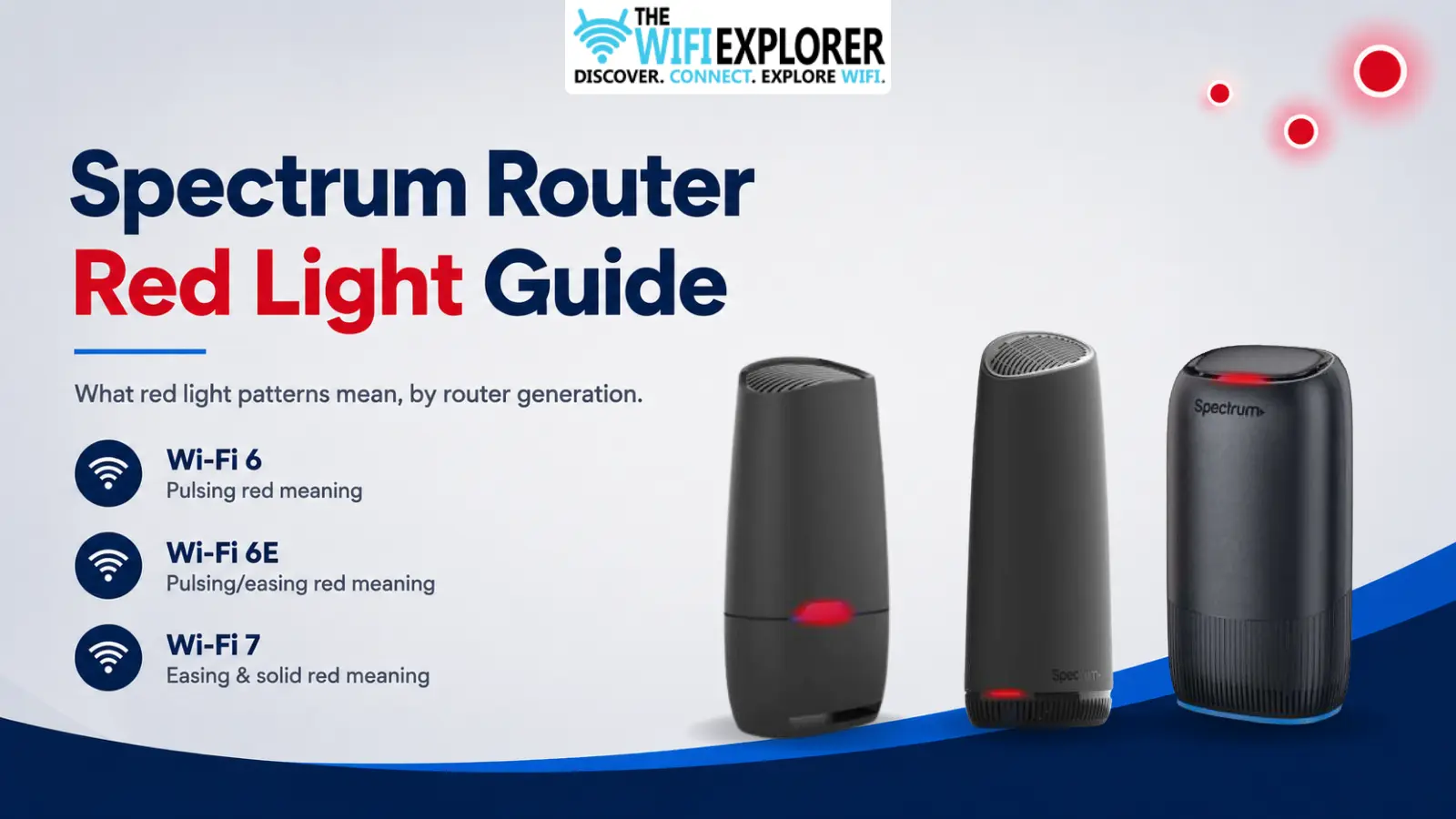
A red light on your Spectrum router tends to get people’s attention fast, and for good reason.
Unlike white or blue, red almost always means something needs a look. What it doesn’t tell you, at least not at a glance, is which something.
I covered this briefly in the general Spectrum router lights guide, but red deserves its own deep dive, because it’s the one color that genuinely means different things depending on whether you’re running the Wi-Fi 6, Wi-Fi 6E, or Wi-Fi 7 router.
Apply the wrong model’s fix here, and you can end up chasing a problem that isn’t actually yours.
This guide breaks red down model by model: what it means, why it happens, and exactly what to do about it.
Key Takeaways
- Red doesn’t mean the same thing across all three Spectrum router generations; confirm your model before troubleshooting.
- On Wi-Fi 6 and 6E, red pulsing usually indicates a lost connection, though 6E’s documentation also describes it as connectivity without management access.
- On Wi-Fi 7, the pattern matters as much as the color: easing red means one thing, solid red means something else.
- Always check for a local outage before touching cables or resetting anything; a red light during an outage will not respond to troubleshooting.
- A factory reset should be your last step, not your first, since it wipes your custom Wi-Fi name and password.
Quick Reference by Model
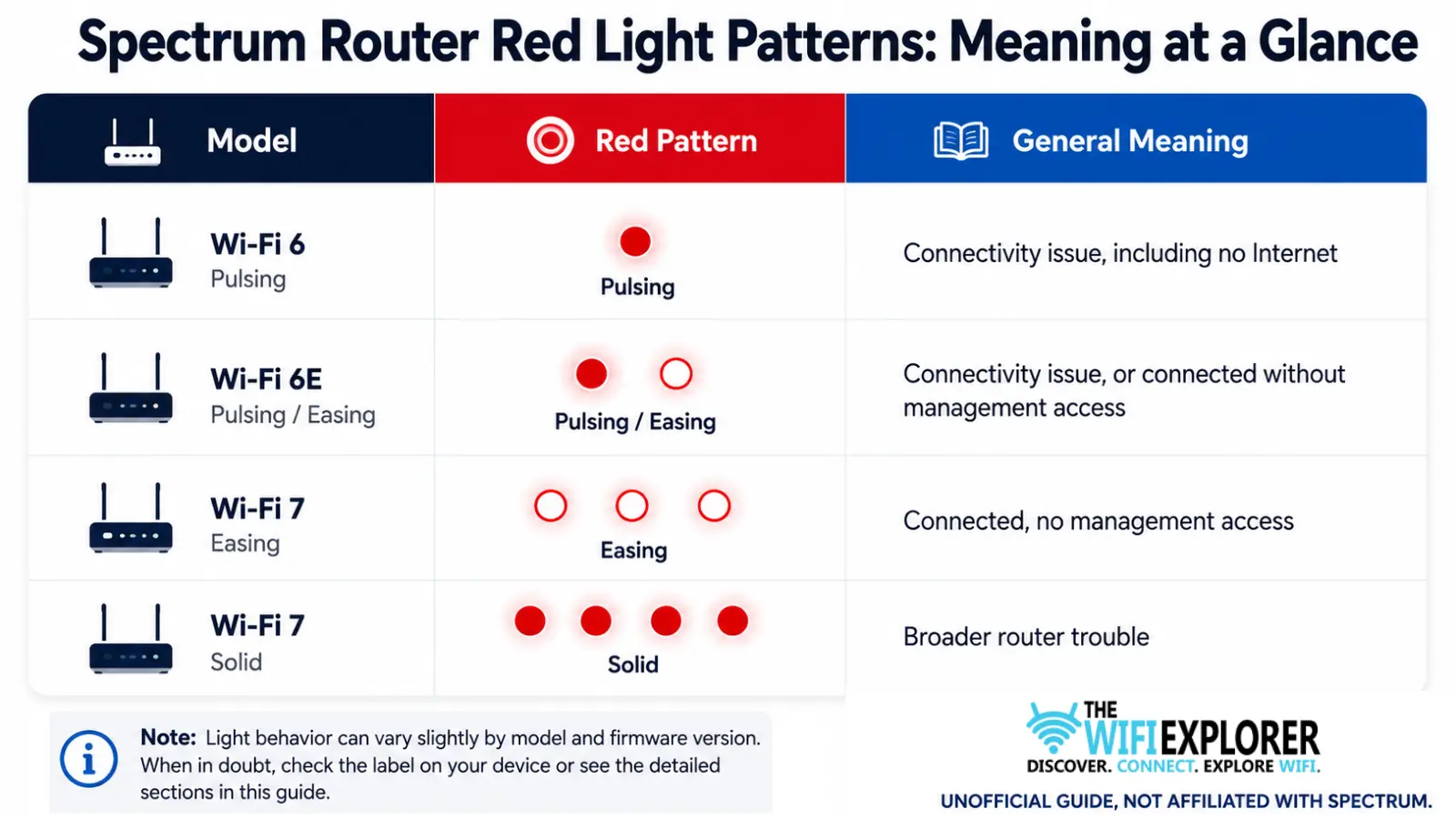
Not sure which router you have? Check the label on the unit itself, or look under the Wi-Fi section of the My Spectrum app.
Spectrum Router Blinking Red
A blinking or steady red light on your Spectrum router is its way of flagging that something needs attention, though what exactly depends on which router you own.
It can mean a lost internet connection, a temporary loss of management access, or broader hardware trouble, and mixing those up leads to troubleshooting the wrong problem.
The sections below break down what red means, why it shows up, and how to fix it for each Spectrum router generation: Wi-Fi 6, Wi-Fi 6E, and Wi-Fi 7.
Wi-Fi 6 Router: Red Pulsing
What It Means
On the Wi-Fi 6 router, a pulsing red light points to a connectivity issue, and that can range from a weak signal all the way to no internet connection at all.
Why It Happens
- A local Spectrum outage
- A loose or damaged coax cable
- A faulty splitter sitting between the wall and the router
- The modem not properly activated or provisioned on Spectrum’s network
- Physical line damage from weather, or just age
How to Fix It
Check for an outage first. Pull up Spectrum’s outage map or the My Spectrum app before doing anything else. If there’s a known outage in your area, nothing below will fix it, you’re just waiting it out.
Inspect and reseat your cables. Run your hand along the coax cable and check both ends are actually seated, not just resting in the port. If you’re using a splitter, try bypassing it entirely and connecting the coax straight from the wall to the router. Splitters fail more often than people expect.
Power cycle properly. Unplug the router, wait a full 30-45 seconds, then plug it back in. A lot of people rush this step; five seconds isn’t enough for the hardware to fully reset.
Factory reset as a last resort. If the light’s still pulsing red after all of the above, a factory reset can clear a stuck provisioning error. This wipes your Wi-Fi name, password, and any custom settings, so treat it as the final step, not the first one.
If none of this clears it, the red light likely means something’s wrong upstream of your router, and that’s a call to Spectrum support.
Wi-Fi 6E Router: Red Pulsing or Easing
What It Means
This is where things get genuinely a little murky. Spectrum’s own documentation for the Wi-Fi 6E router has described the red-pulsing state in two different ways across versions, sometimes as a connectivity issue with no internet, and sometimes as connectivity without management access.
Those are meaningfully different problems; one means you’re offline, the other means your devices can still reach the internet, but you can’t access the router’s own settings remotely.
Why It Happens
- A Spectrum outage
- Loose coax or Ethernet connections
- A provisioning issue on Spectrum’s end
- A temporary loss of communication between the router and Spectrum’s management servers, separate from your actual internet connection
How to Fix It
Test your actual internet first, before assuming it’s down. Since the red light on this model doesn’t reliably mean “no internet,” check whether your devices can actually load a webpage before troubleshooting like you’re offline. If they can, the issue is likely the management-access variant, not a connectivity outage.
Check for an outage. Same as with the Wi-Fi 6 router, this rules out the biggest cause before you touch anything physical.
Check your cable connections. Loose coax or Ethernet at either end is still one of the most common culprits regardless of which version of the red-light meaning applies.
Restart the router. Give it a proper 30-45 second unplug, not a quick unplug-replug.
Factory reset if the above doesn’t help. Same caveat as the Wi-Fi 6 router: it clears your custom settings, so save it for last.
Wi-Fi 7 Router: Red Easing vs. Red Solid
What It Means
The Wi-Fi 7 router is where the pattern itself, not just the color, actually matters. A slow, smooth easing red light specifically means the router has connectivity but no management access; you’re online, you just can’t reach the router’s admin settings remotely. A solid, steady red light means something different: broader router trouble.
Spectrum defines easing as a gradual fade in and out, as opposed to flashing, which switches abruptly. If you’re not sure which one you’re looking at, watch it for about 10-15 seconds; a true easing pattern is unmistakably slower than a flash.
Why It Happens
Easing red (no management access):
- Temporary loss of communication with Spectrum’s management servers
- A firmware or app sync issue that doesn’t affect your actual internet connection
Solid red (router trouble):
- A hardware fault
- A more serious connectivity failure
- An unresolved issue that basic troubleshooting hasn’t cleared
How to Fix It
For easing red: Check the My Spectrum app and confirm your internet is actually working on connected devices. If it is, this usually resolves on its own within a short window as the router re-establishes contact with Spectrum’s servers. If it persists past 20-30 minutes, restart the router.
For solid red: Start with the basics, check for an outage, inspect your cables, and power cycle the router properly. If solid red persists after that, this pattern specifically warrants contacting Spectrum support rather than continuing to troubleshoot on your own, since it’s meant to flag something more significant than a routine hiccup.
General Troubleshooting Tips for Any Red Light
- Identify your router model before you do anything else. It changes what the light actually means, and skipping this step is the most common reason people troubleshoot the wrong problem.
- Outage first, always. No amount of cable-checking fixes a red light caused by a Spectrum-side outage.
- Give power cycles real time. 30-45 seconds unplugged, not a quick toggle.
- Don’t confuse red with a firmware update. If you see red alternating with blue (or blue/green on the Wi-Fi 6 router), that’s a firmware update running, not a problem. Leave it alone.
- Save the factory reset for last. It wipes your settings and won’t fix anything happening on Spectrum’s side of the connection anyway.
When to Contact Spectrum Support
If you’ve confirmed there’s no outage, checked your cables, restarted the router properly, and the red light is still there after 20-30 minutes, it’s a reasonable point to call it in. Have this ready:
- Your account information
- The exact router model
- Whether the red light is pulsing, easing, or solid
- How long it’s been stuck
- What you’ve already tried
That last one matters more than people think; it saves you from getting walked through the same steps you already did.
Final Words
Red is the one Spectrum light color that genuinely doesn’t have a single answer, and that’s exactly why it trips people up more than white or blue ever do.
On the Wi-Fi 6 router, it’s a straightforward connectivity flag. On the Wi-Fi 6E router, it can mean either no internet or just no remote access, and telling the two apart starts with checking whether your devices can actually get online. On the Wi-Fi 7 router, the pattern itself, easing versus solid, carries more information than the color alone.
Once you know which router you have and which version of red you’re looking at, the fix is almost always the same short list: check for an outage, check your cables, restart properly, and reset only if nothing else works. Past that, Spectrum Support can tell you in minutes what would otherwise take an hour of guessing.
FAQ
Why is my Spectrum router flashing red?
It depends on your model. On Wi-Fi 6 and 6E, pulsing red generally points to a connectivity issue. On Wi-Fi 7, an easing red light means you’re connected but lack management access, while a solid red light points to broader router trouble.
Does a red light always mean no internet?
No, and that’s the most common misunderstanding here. On the Wi-Fi 6E and Wi-Fi 7 routers specifically, red can mean you’re connected but can’t reach the router’s management settings, not that you’re offline. Test your actual internet before assuming the worst.
How do I know if my Spectrum router’s red light means an outage?
Check Spectrum’s outage map or the My Spectrum app before troubleshooting anything else. If there’s a reported outage in your area, cable checks and resets won’t help until it clears.
What’s the difference between easing and solid red on the Wi-Fi 7 router?
Easing is a slow, gradual fade and means connectivity without management access. Solid is a steady, unblinking red and points to more general router trouble. The pattern matters as much as the color on this model.
Should I factory reset my router if the light is red?
Only after you’ve ruled out an outage, checked your cables, and power cycled properly. A factory reset wipes your custom Wi-Fi name and password, so it’s a last resort, not a first move.